
The following advanced features are available on select iConverter® modules, and are configured using Omnitron’s NetOutlook™ SNMP-based management software, any third-party SNMP management software, Telnet or Serial/Modem connection.
Refer to the iConverter Comparison Chart for advanced features supported on each iConverter module
Auto Negotiation
iConverter modules support various levels of Auto Negotiation on fiber and UTP ports. Auto Negotiation enables two Ethernet devices establishing network connectivity to communicate their Duplex modes, data rates and pause capabilities, and establish a network connection of optimal performance. iConverter Auto Negotiation also provides the ability to constrain maximum negotiated speed on 10/100 and 10/100/1000 UTP ports.
iConverter Auto Negotiation eliminates the mismatching of port configurations, including Duplex modes. Duplex Mismatch is one of the most common network problems, which can recur as interfaces go up and down and network hosts are updated and changed. Part of the 10 Mbps Ethernet legacy, this problem is trivial to fix but can be difficult to identify and localize.
Duplex modes, data rates and pause capabilities can also be configured manually via management software or with Dip-switches located on iConverter modules.
<h3 >Auto Crossover
Select iConverter modules support Auto Crossover (MDI/MDI-X) on the UTP port to eliminate the need for a crossover cable when connecting to different workstations and network equipment.
Built-In Switch Technology
By integrating switch technology into media converters and offering multi-port switch modules, the iConverter product line provides the ability to perform 10/100 and 10/100/1000 rate switching and switch data flow between multiple fiber and copper ports. Combining managed media converters and switch modules in a compact chassis enables a fiber uplink to be distributed to end users via multiple copper ports. With built-in switch technology, all module ports support advanced features including VLAN, QoS, Port Access Control and Bandwidth Control – all at a price point that facilitates the deployment of new data, voice and video to end users that were prohibitively expensive before.
Ethernet Backplane Connectivity
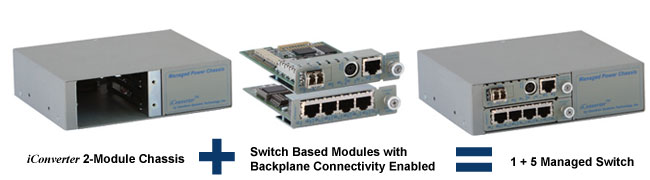
The iConverter 19, 5 and 2 module chassis support backplane connectivity between modules. The example below illustrates a 2-Module chassis backplane that enables sharing of Ethernet data between two installed iConverter modules. Installed modules that are equipped with Ethernet backplane ports have the ability to connect to each other via the chassis’ Ethernet Backplane and facilitate a variety of flexible network applications including unmanaged, Out-of-Band managed, In-Band managed and multi-port configurations.
Port VLAN and Port Access Control
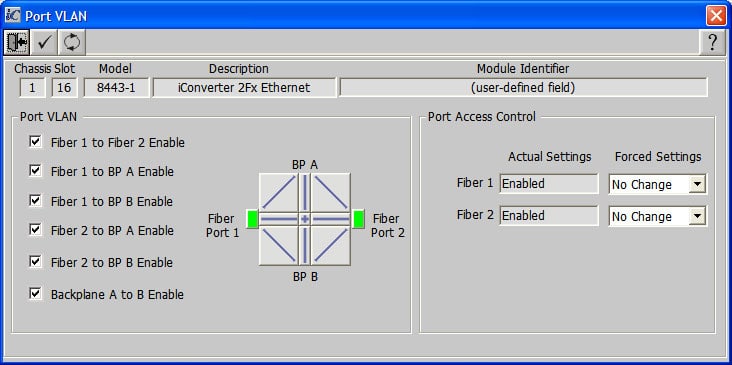
Port VLAN enables a network administrator to specify and restrict traffic flow between the front ports (UTP and/or Fiber) and the backplane ports to enhance security and intrusion protection.
Port Access Control enables easy control and denial of individual port access while maintaining port configuration for easy port re-enabling. Enterprise administrators can improve network security by controlling port access when a port is not in use.
Tag VLAN Technology
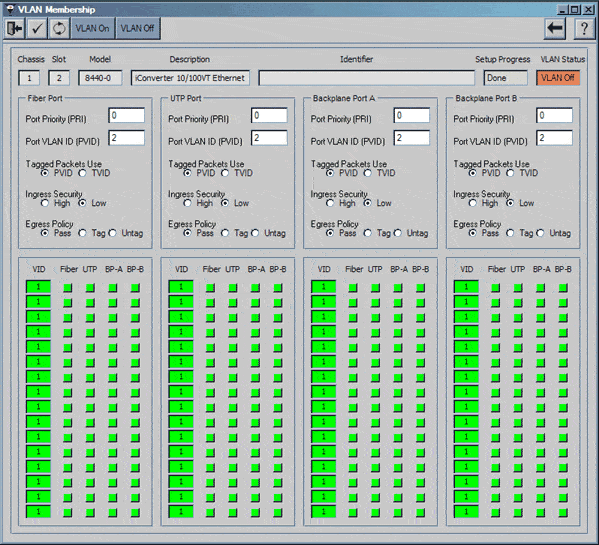
Select iConverter media converter and Network Interface Device modules support the IEEE 802.1Q VLAN packet tagging and untagging standard, including Q-in-Q tag-stacking. Enterprise networks that segregate VLAN data by department, location or device can use iConverter VLAN media converters as intelligent switches that securely isolate and direct VLAN data. iConverters also support management VLAN which enables tagging of network management, providing an added level of security by segregating network management from user data, and preventing denial of service attacks.
Quality of Service (QoS)
Support of the IEEE 802.1p prioritization enables delivery of Quality of Service (QoS) to high priority, real-time applications such as voice or video over Ethernet. iConverters that support QoS allow users to assign a QoS data prioritization level for untagged VLAN data. The larger the numerical value assigned to the data prioritization, the higher the priority for data flowing from that port. When the network becomes busy, prioritized packets will go through the port first.
An iConverter module that supports QoS will determine which packets get priority. The data packets assigned a low priority get "parked" for a few milliseconds as packets assigned a high priority are passed through the network on to their destination without loss of quality.
Bandwidth Control
Bandwidth Control enables the network administrator to delegate specific bandwidth levels to different users or departments on a per-port basis. Different levels of bandwidth can be selected for the fiber-to-UTP and the UTP-to-fiber directions, thereby optimizing the available network bandwidth resources and to meet the specific needs of different users.
Port MIB Statistics
Select iConverters support the reporting of Port MIB (RMON1) statistics. Reports are available for 32 variables per port, reporting real-time packet statistics to provide performance and operational monitoring. Port statistics are used to determine end-user bandwidth usage and the health of the network data traveling through individual ports.
Configuring of Port Polling parameters for MIB statistics collection and display can be set to the following parameters with the NetOutlook SNMP-based management software:
- Port Selection - Allows selection of a port on which to collect statistics
- Polling Rate - Allows selection of statistics poll and display rate in seconds
- View Values - Allows selection to view statistics, either in cumulative mode or since the last reset
The following categories of MIB data are collected for the following statistics and can be displayed in the NetOutlook control software:
- Transmitted (Tx) Good Packet
- Received (Rx) Good Packets
- Transmitted (Tx) Errored Packet
- Received (Rx) Errored Packets
- Transmitted (Tx) Collisions
- Received (Rx) Size Errors
Link Fault Detection Modes
iConverter media converters support different combinations of user-selectable Link Segmentation, Link Propagation, Remote Fault Detection and Symmetrical Fault Detection modes for quick fault detection and isolation. Link modes are configurable via management software or with DIP-switches. These modes operate independently of the network management and monitor the state of the cabling hardware.
- Link Segmentation (LS): The normal (default) mode where the UTP and fiber ports establish their links to other connected devices independently of each other.
- Link Propagation (LP): In this mode (also known as “Link-Loss-Carry-Forward”), a link-out from the UTP port is generated only when a link-in to the fiber port is present, and a link-out from the fiber port is generated only when a link-in to the UTP port is present. In LP mode, a cable or link fault is propagated in a “domino” fashion to downstream or upstream connected equipment, enabling rapid fault detection.
- Remote Fault Detection (RFD+LS): In RFD+LS mode, the fiber port transmits a link signal only when receiving a link. As a result, fiber faults (no link received at the fiber) are looped-back and can be reported to the network core.
- Symmetrical Fault Detection (SFD): SFD mode is similar to the RFD mode and provides a loop-back of a fiber link fault. When connecting two SFD configured converters “back-to-back,” this mode facilitates fiber or UTP fault notification to both ends of the network.
Using these Link operation modes, the iConverter management software is capable of detecting and reporting most local and remote cabling or device failures. Detection of a hardware fault can trigger corrective actions such as a Spanning Tree fail-over re-linking or proprietary trunk re-linking.
The traps generated through the SNMP agent and reported via the NetOutlook software (or any other SNMP network management software), coupled with automatic failure correction features, make the iConverter an ideal element in enterprise, campus or metropolitan network applications
CWDM Multiplexer Expansion Port
The iConverter CWDM/X and Single-Fiber CWDM/X feature an optional Expansion Port that can be used to cascade two MUX/DEMUX modules, doubling the channel capacity on the common fiber link. For example, two 4-Channel MUX/DEMUX modules can be cascaded to create an 8-Channel fiber common link, or two 8-Channel modules can be cascaded to create a 16-Channel fiber common link.
CWDM Multiplexer 1310 Pass Band Port
The CWDM/X also features an optional 1310nm Pass Band Port that can be used to overlay up to 8 CWDM channels on an existing legacy 1310nm network such as SDH or SONET (which normally operates in the 1260nm to 1360nm wavelength spectrum). This feature allows the CWDM channels in the range of 1470nm to 1610nm to be overlaid on the same fiber pair as the existing 1310nm network with no changes to the legacy equipment.

